 Meteopolis
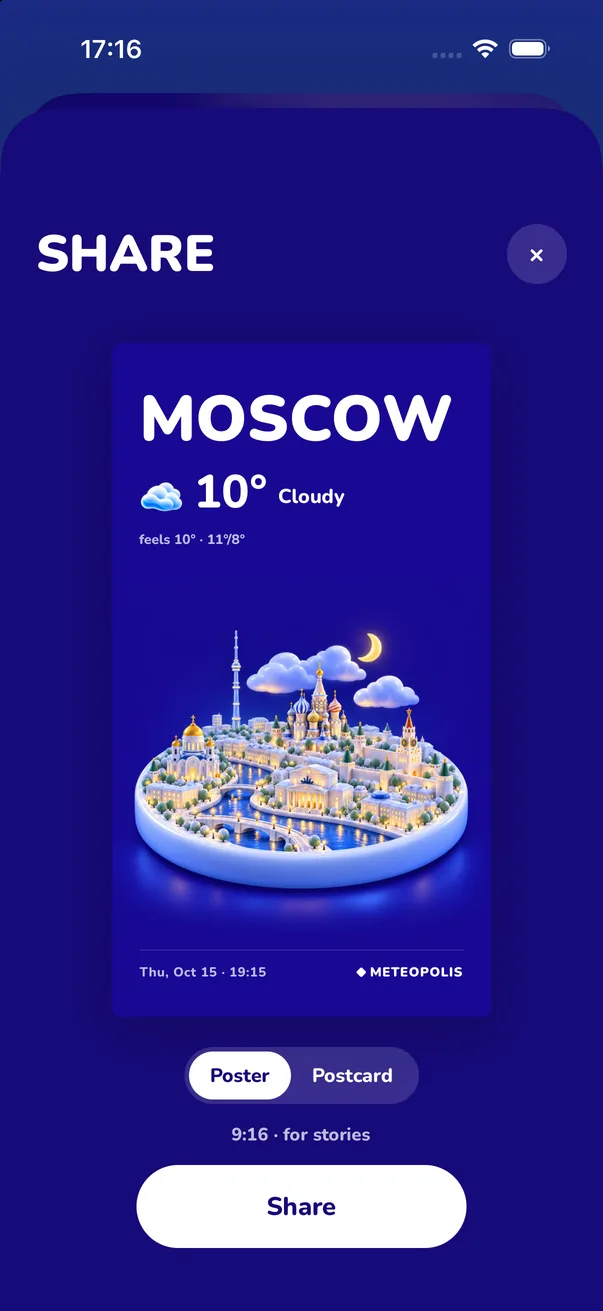
To share the weather on your Instagram Story: open Meteopolis, scroll down on your city and tap Share this city card, choose Poster (9:16, sized for Stories), tap Share and pick Instagram, or Save Image and add it from your camera roll.
Step by step
- Pick a style that fits your feed (Settings → Scene style).
- On your city, scroll down and tap Share this city card.
- Choose Poster. It's 9:16, so it fills a Story with no cropping. (Postcard is a landscape card, better for messages and posts.)
- Tap Share and choose Instagram, or tap Save Image and add it to your Story from your camera roll.
- Add a sticker or a poll ("Who else is snowed in?") and post.
Weather stories that get replies
- The big moments: first snow, record heat, a storm warning. People reply when the weather is news.
- Two cities: post your city and a friend's in the same style ("Paris 12° vs Dakar 32°").
- Travel: a poster of each city you land in, in one style, as a highlight.
- Match the mood: Crochet for cozy rainy Sundays, Neon for a Friday night.
Other places to share
The same Share button works for TikTok, Messages, WhatsApp and X. You can also save the poster as your iPhone wallpaper.
Quick answers
How do I post the weather on my Instagram Story?
In Meteopolis, tap Share this city card, choose Poster, then tap Share and pick Instagram.
What size is the Meteopolis poster?
The poster is 9:16, the same shape as an Instagram Story.
Try Meteopolis free
Your city as a living miniature, in 45 styles. Free to download for iPhone and iPad.